Thursday, March 25, 2010

Run A Macro By Opening A File

Eric,

Referring to your question on how to run a macro when you open a file with the condition if current time is between 9 am and 10 am, otherwise, don't run this macro.

I had create a Open event at the ThisWorkbook objects. You can use the If statement below, and change Msgbox below to Run to run your macro.

Wednesday, March 24, 2010

Linking Data From Form To Database

Many of us need to updata details of documents into a database/master list. Many of us always forget to update the database. It is good if we can update the database automatically whenever the changes of documents.

The example below show you if you can smart use of the template wizard function, you can updating database/master list automatically whenever the change of documents.


Now you can see the real life examples how other people work smart by smart use of Microsoft Office (Microsoft Excel, Word and PowerPoint) in a series of Microsoft Office (Microsoft Excel, Word and PowerPoint) book. You can view the coverage and special features of the books at Youtube and get the books in ebay.

Tuesday, March 23, 2010

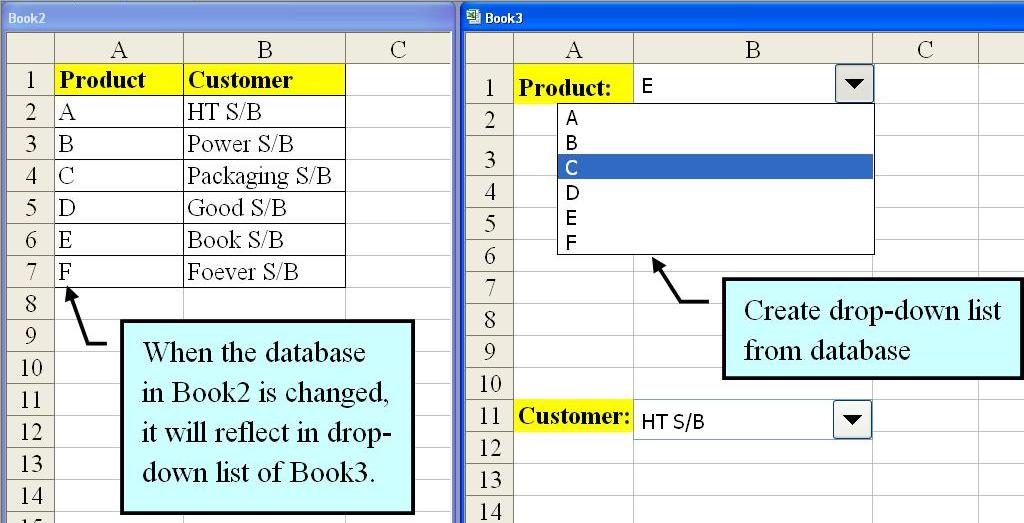
Create Drop-down List From Other Workbook

Juan,

Regarding your question of creating drop-down list at other workbooks by using the database from different workbook. When the database is revised, the drop-list of all the related workbooks will change accordingly. I had show the ways of doing so.

1. Create drop-down list where the data get from other workbook.

2. Show the Form toolbar.

3. Show Format Control dialog box.
4. Setting the Input range from other workbook.
5. The drop-list down is created after click OK.


Sunday, March 21, 2010

Retrieve Data From Excel To Prepare Other Document

Most of us like to prepare database in Microsoft Excel. If we can smart use of the database, we can use the information from the database in Excel to prepare other documents for example use the company details to prepare envelope as the example below.

After linking the database from Excel to Word in envelope, simply by clicking the arrow, you can prepare envelope of other company easily.

You can also use the same database to prepare other document like letter/quotation by adding in other additional columns.


Now you can see the real life examples how other people work smart by smart use of Microsoft Office (Microsoft Excel, Word and PowerPoint) in a series of Microsoft Office (Microsoft Excel, Word and PowerPoint) book. You can view the coverage and special features of the books at Youtube and get the books in ebay.

Combine Data Into A Form Automatically

Are you fed up with keep asking your colleagues to update a form for you? Some staffs especially a ISO 9000 Project Coordinator always need to ask their colleagues updating a form. Now if you can smart use of Microsoft Office Excel functions, you can just email a form for all coleagues to update it then reply to you. When they reply to you, you can then compile the data into your form automatically. If they forget to update it, just email to them as reminder again. You can even set email to them at a fixed frequency.
The example below show you how the example of getting suppliers' evaluation from respective departments by emailing to them. After receive their reply, you can then update into your form automatically.


Now you can see the real life examples how other people work smart by smart use of Microsoft Office (Microsoft Excel, Word and PowerPoint) in a series of Microsoft Office (Microsoft Excel, Word and PowerPoint) book. You can view the coverage and special features of the books at Youtube and get the books in ebay.

Wednesday, March 17, 2010

View Multiple Worksheet At The Same Time

When we want to update/cross check from a document to another document, it is good if we can view the related document/worksheet at the same time. It can save our time keep referring to another document/worksheet. View the related document/worksheet at the same time is important especially we want to link master list/database with documents. This can enable us check whether the updating is accurate or not.

Update Master List/Database Automatically

Many of us need to update the details of documents into a master list/database. When there is a change to the document, the master list/database need to update again. Most of us may forget to update the master list/database. Therefore, this book will teach you how to smart use of Microsoft Excel and Word, the master list/database can update automatically whenever the change of the document.

For the example below, you can see whenever the document's Revision Number in Microsoft Word is changed, the master list/database is changed according to document.


Some user like to create their document and master List/database in Microsoft Excel, therefore the book also teach you how to update master list/database automatically whenever the document is changed.

Now you can see the real life examples how other people work smart by smart use of Microsoft Office (Microsoft Excel, Word and PowerPoint) in a series of Microsoft Office (Microsoft Excel, Word and PowerPoint) book. You can view the coverage and special features of the books at Youtube and get the books in ebay.