Showing posts with label Forum. Show all posts

Thursday, January 26, 2012

Create Calculated Field At PivotTable

Question:

How can I create a calculation from the total of a count of a field on a pivot table? Example: I need to calculate the number of employees for each process level times a specified amount - 89 x $4.59, 3 x $4.59.

Answer:
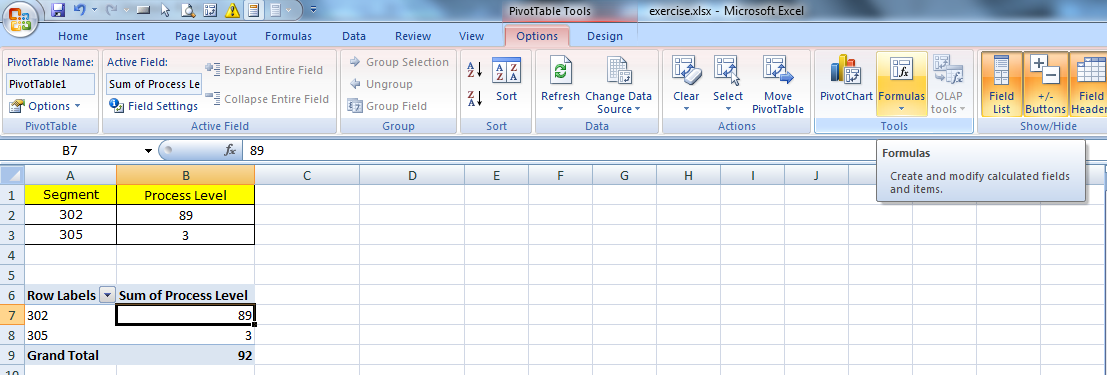
Select the table and click Insert, PivotTable. Drag the required field to relevant label (Refer the details of creating pivotTable at post Show Variance Between Year PivotTable). Create the pivotTable as Picture 1. To create a calculated field, click at the pivotTable and click Option, Formulas, Calculated Field.

Picture 1

A Insert calculated Field will show, type the name for the calculated field and type the formula, then click Add, click OK.
Picture 2


The calculated field will then created as following:


Wednesday, January 25, 2012

Show Variance Between Year PivotTable

Hi AJ,

Question:
I need to create a variance formula for the data selected in a pivot table.


My problem is that the data is coming in from one column and I don't know how

to distinquish the data by year in the formula. I have put a small selection

of my data below. I would like to show the variance between 2009 and 2010

for all months selected in the pivot table.
 
 
Answer:
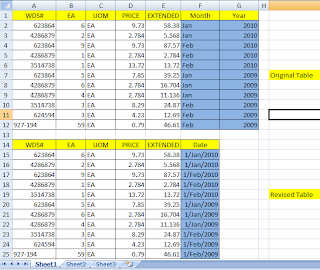
Base on the question and data, I summary it in the Original Table below (Picture 1). In order to show the variance between 2009 and 2010, I believe the better way is summary the Month and Year column into Date column as Revised Table below. With the Date column, you can manipulate the data into many way as you like as explanation below.
 
Picture 1

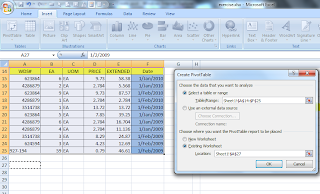
After you revised the table to Date column, you can select the table and click Insert, PivotTable. Select the appropriate option as Picture 2.


Picture 2


Simply drag the required fields to Columns Label, Row Labels, Values, or Report Filter at PivotTable Field list. The PivotTable will then created.
Picture 3
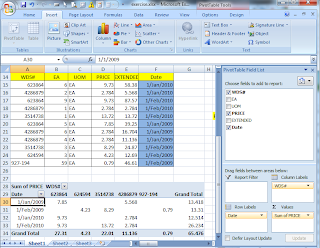

Now you can manipulate the PivotTable as you like. You can group the date by year. Click at the date field, right-click and select Group.

The Grouping message box will show. Make the selection. In this case, I want to group by Year, so select Years. Then click OK.

Now you can see the different of year 2009 and 2010. Hopefully it can solve your question. If not, do not hesitate to write your question at comment. Thank you.

Thursday, April 15, 2010

Include a value from one cell within text of another cell.

Regarding the question when user enter data in cell B4, the cell B5 will show text such as " X is not a valid entry. Please enter the correct pair number." for entry of 25~150 (X is the enter number). You can use the formula below at cell B5:


You can also use Data Validation at Data, Data Validation by setting Setting below.


You can also set message box to display by setting Error Alert below.

When the number 25 to 150 is enter, a message box and text is displayed as below.

Thursday, April 1, 2010

Check box help in Word

Regarding the question of a faster way to do check/uncheck these boxes, I propose create a command button to perform you required action. To do this, you need to create a simple program to do this.

Follow the steps below:
1) Insert Checkbox (from Forms toolbar) and Commandbutton (from Control Toolbox). (For Word 2007, click Customize Quick Access Toolbar, More Command, Choose Command From: All Command, add Check box, Command button).
2) Select the Commandbutton and right-click to select View Code.

3) The Microsoft Visual Basic will open for you to write coding. Write this statement to enable the checkbox check after press command button.

ActiveDocument.FormFields("Check1").CheckBox.Value=True

4) Double-click the checkbox to ensure the check box name is tally.

5) Select the commandbutton and right-click to select CommandButton Object, Edit to change the commandbutton caption to "Check".

6) Click Exit Design Mode. Now you can click the "Check" button to check the checkbox. (For Word 2007, click Customize Quick Access Toolbar, More Command, Choose Command From: All Command, add Design Mode).

7) Now, when you click the button, the check box will check. You can also write other program to perform action required by you.

Thursday, March 25, 2010

Run A Macro By Opening A File

Eric,

Referring to your question on how to run a macro when you open a file with the condition if current time is between 9 am and 10 am, otherwise, don't run this macro.

I had create a Open event at the ThisWorkbook objects. You can use the If statement below, and change Msgbox below to Run to run your macro.

Tuesday, March 23, 2010

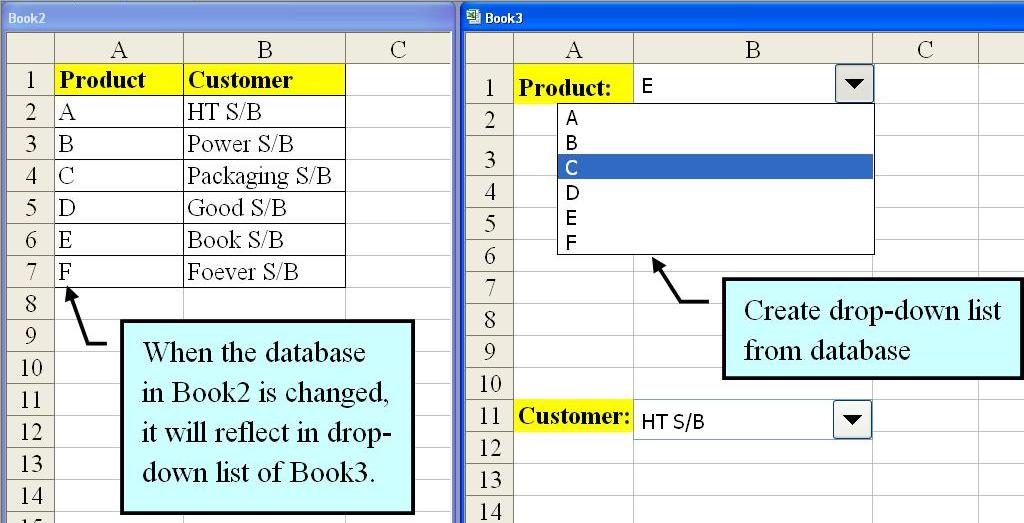
Create Drop-down List From Other Workbook

Juan,

Regarding your question of creating drop-down list at other workbooks by using the database from different workbook. When the database is revised, the drop-list of all the related workbooks will change accordingly. I had show the ways of doing so.

1. Create drop-down list where the data get from other workbook.

2. Show the Form toolbar.

3. Show Format Control dialog box.
4. Setting the Input range from other workbook.
5. The drop-list down is created after click OK.